By Andrew Stowers
Updated June 30, 2026
A trading alert is not a trade. It is a notification that a pre-defined condition has been met — price hit a key level, MACD crossed, volume spiked.
What happens after the alert fires determines whether it produces a profitable trade or an impulsive entry taken without context, confirmation, or defined risk. The traders who profit from trading alerts are not the ones with the most alerts — they are the ones with the clearest system for converting a notification into a disciplined trade decision.
This guide covers all five types of trading alerts, how to set them up on the major platforms, and the rules-based framework that makes alerts genuinely useful tools rather than noise. After reading this article, we highly recommend you review our Stock Trading Guide that covers many of the foundational concepts touched on in this article but in much greater detail.
Alerts vs Signals: The Distinction That Changes Everything
| The Core Distinction
An alert is a notification — it reports that a specific condition has been met. A signal is an actionable trade recommendation — it specifies what to buy or sell, at what price, with what stop and position size defined. Most alerts require additional analysis, context assessment, and risk definition before they become signals. |
Most trading platforms and alert services blur this distinction to the point where traders receive an alert and execute immediately — treating the notification as the trade decision. This is the most common and most consistently costly mistake in alert-based trading.
The Same Alert, Two Different Contexts, Two Different Decisions
Consider a MACD crossover bullish alert on stock XYZ. Scenario A: the alert fires while TICK is running above +600, XYZ is above its VWAP, the broad market is in an uptrend, and volume on XYZ is running 2x average. That alert, in that context, is a potential high-conviction entry. Scenario B: the same alert fires while TICK is below -400, XYZ is 2% below its VWAP, and the broad market is breaking a key support level. The same chart signal in that environment is a low-probability trade that should be passed.
The alert is identical. The trade decision is opposite. The context is what converts the notification into a decision — and the context cannot be automated.
ATGL’s Framework: Alert as Trigger, Not Decision
An alert triggers an analysis sequence. The decision comes at the end of that sequence after confirmation, risk definition, and context assessment have all been completed. Sections 4 and 6 of this article build that sequence step by step.
The Five Types of Trading Alerts Every Active Trader Should Use
Trading alerts serve five distinct purposes in an active trading workflow. Understanding which type you are setting — and what analytical response each one warrants — is the foundation of an effective alert system.
| Type | Alert When… | Appropriate Analytical Response |
|---|---|---|
| 1. Price & Level | Stock reaches a specific price or key technical level | Assess context: is this a breakout or a failed test? Check TICK, volume, broader trend |
| 2. Technical Indicator | MACD crosses, RSI reaches threshold, MA break | Confirm indicator signal with price action and market internals before acting |
| 3. Volume / Unusual Activity | RVOL spike, unusual options flow, dark pool print | Identify the potential catalyst; assess whether move is confirmed or noise |
| 4. News / Catalyst | Earnings, FDA decision, analyst rating change | Determine whether news is priced in; assess post-announcement price action |
| 5. Pattern Completion | Stock breaks out of a chart base or pattern level | Verify breakout quality: volume, follow-through, context alignment |
Type 1 — Price and Level Alerts
The most universally available and simplest alert type. Set at key support and resistance levels, all-time highs, 52-week highs and lows, and round numbers. Fires when price reaches the pre-defined level. Most useful for watchlist stocks you want to monitor without watching continuously — the alert brings you to the chart when the relevant level is being tested.
Type 2 — Technical Indicator Alerts
Fires when an indicator reaches a threshold or produces a crossover: MACD histogram turns positive, RSI falls below 30, price crosses above the 50-day moving average, stock reclaims its anchored VWAP level. These alerts identify potential setup completion but require confirmation before trading. ATGL’s detailed indicator guides cover the MACD and anchored VWAP specifically — the alert triggers review, not execution.
Type 3 — Volume and Unusual Activity Alerts
RVOL (relative volume) alerts fire when a stock’s volume is running significantly above its baseline — 2x, 3x, or 5x average daily volume. Unusual options activity (UOA) alerts fire when options contract volume significantly exceeds open interest on a specific strike — suggesting a large, potentially informed position is being established. Dark pool prints flag large off-exchange block transactions. These alerts signal that something unusual is happening that may precede a directional price move.
Type 4 — News and Fundamental Catalyst Alerts
Earnings announcement dates, FDA approval or rejection decisions, analyst upgrades or downgrades, and major economic data releases (CPI, non-farm payrolls, Federal Reserve decisions) all produce catalyst-driven price moves. Set via financial news services, brokerage news feeds, or earnings calendar tools. The analytical question when a catalyst alert fires: is the news priced in, or does it genuinely change the investment thesis?
Type 5 — Pattern Completion Alerts
Breakouts from consolidation bases, flag and pennant completions, cup-and-handle breakouts, and first-day-out-of-range signals are harder to automate than price alerts. The practical approach: identify the pattern on the chart, set a price alert just above (for bullish patterns) or below (for bearish patterns) the breakout level, and review manually when the alert fires.
How to Set Up Trading Alerts on the Major Platforms
TradingView: The Most Flexible Alert System
TradingView supports alerts on virtually any price level, indicator value, drawing tool, or custom Pine Script condition across equities, futures, forex, and crypto.
Setup: Right-click on a price level on the chart → ‘Add Alert’ → configure: Condition (Crossing, Greater Than, Less Than), Value (the trigger threshold), Expiration (a specific date or persistent), Trigger (Once, Every Time, Once Per Bar), Notification (push to mobile app, email, SMS, webhook, browser sound). For indicator-based alerts: right-click on the indicator line or value area → ‘Add Alert’ → same configuration options.
Key TradingView notes: free accounts have a limited number of simultaneous active alerts; the TradingView mobile app must be installed for push notification delivery; webhook alerts can trigger automated systems for advanced users.
Thinkorswim (TD Ameritrade/Schwab): Most Powerful for Active Traders
Thinkorswim supports two alert mechanisms: simple price alerts and scanner-based complex condition alerts.
Simple price alert: MarketWatch tab → find the symbol → right-click → ‘Set Alert’ → select condition (Last Price, Bid, Ask, Volume, % Change) → enter value → choose delivery method (pop-up, email, text message).
Scanner-based alert: Scan tab → Stock Hacker → configure multi-condition scan criteria (for example: 50-day MA cross + volume above 500,000 + price above $20) → after building the scan, set it to alert when new symbols meet the criteria on each scan refresh. This multi-condition capability is Thinkorswim’s primary advantage over simpler platforms — alerts can encode an entire entry checklist rather than a single data point.
Alert Precision: The Most Actionable Improvement
Vague alerts produce noise. Specific alerts produce actionable notifications. ‘Alert me when AAPL moves’ is not useful. ‘Alert me when AAPL trades above $175.00 — the prior day high — on volume above 500,000 shares in the first 30 minutes of trading’ is a specific setup condition that merits immediate review when fired.
Alert Management Discipline
Weekly platform hygiene: review all active alerts and delete any that no longer reflect a live, current setup. A stock that broke down three weeks ago but still has a bullish alert set above resistance will eventually fire when the stock bounces — firing into a context where the original setup is no longer valid. Stale alerts create exactly the conditions for the worst alert mistakes (Section 7).
The Rules-Based Framework: Alert → Confirmation → Risk → Decision
| The Four-Step Framework
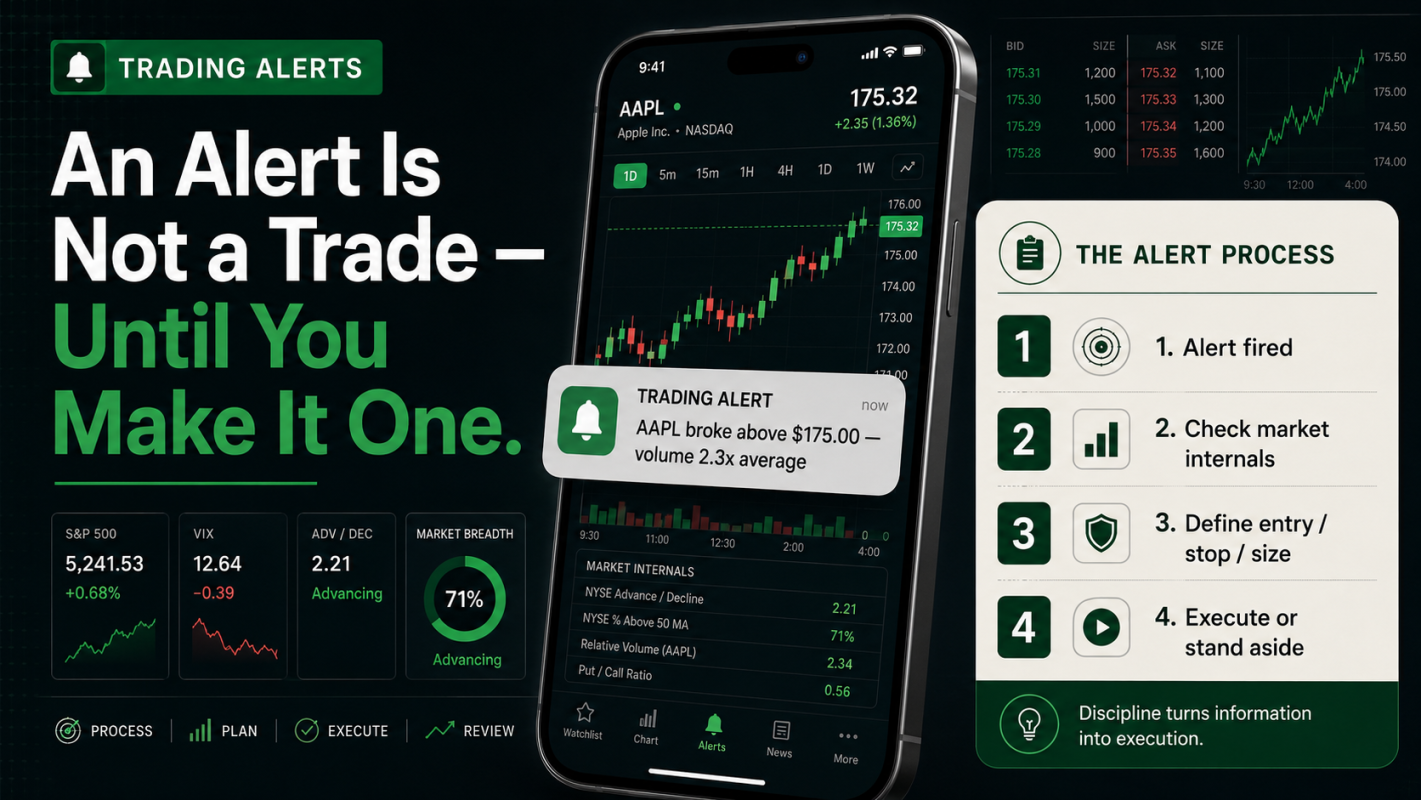
Step 1: Alert fires — the condition you pre-defined has been met. Step 2: Context and confirmation check — does the broader market support this trade? Step 3: Risk definition — entry price, stop level, position size. Step 4: Execution or deliberate stand-aside. Steps 2–4 happen before touching the order entry screen. |
Step 1 — Alert Fires
The alert notification arrives. Nothing has happened yet — no money is at risk, no decision has been made. The alert is the starting gun, not the finish line. The immediate response is to open the chart and begin the confirmation process.
Step 2 — Context and Confirmation Check
For day trades and intraday setups, the confirmation check covers:
- TICK reading: is the NYSE TICK above neutral (+200 or better for longs, below -200 for shorts)? Sustained TICK above +600 confirms broad institutional buying; below -600 confirms broad selling
- ADD (Advance-Decline line): is the number of advancing stocks rising or falling? A rising ADD confirms broad participation in the current move
- Broad market vs VWAP: is SPY or QQQ trading above its VWAP (bullish intraday context for longs) or below (headwind)?
- Volume confirmation: is the alerted move accompanied by above-average volume on the individual stock? Volume confirms institutional participation; low volume on a breakout is a warning
For swing trade setups, the confirmation check extends to the weekly chart (trend direction and relative strength), sector performance (is the stock’s sector leading or lagging the S&P 500?), and earnings proximity: never enter a new swing position with earnings within 5 trading days without explicitly accounting for the event risk.
Step 3 — Risk Definition
Before placing the order, answer three specific questions: (1) Where is my stop if this trade is wrong? — defined by the chart, not by an arbitrary dollar amount; the invalidation level should be a specific price or indicator level that tells you the trade thesis is broken. (2) What position size does that stop imply given my maximum acceptable loss per trade? — calculate position size from the stop, not the other way around. (3) What is my profit target and is the reward-to-risk ratio acceptable? — minimum 2:1 (target twice the distance of the stop), ideally 3:1 or higher. If you cannot define all three, the alert has not yet produced a trade.
Step 4 — Execution or Deliberate Stand-Aside
Execute with the pre-defined entry, stop, and size — or explicitly choose to pass and write down the reason. Standing aside is a trade decision as valid as entering. Documenting stand-aside decisions (the alert fired but TICK was too negative, volume wasn’t confirming, the reward-to-risk was only 1.5:1) builds the systematic knowledge of when your alert conditions produce high-probability setups and when they produce low-probability ones.
Alert Services: Evaluating Subscription-Based Trading Alerts
A paid trading alert service is worth considering only if it meets a specific set of criteria. Most do not — and trading a service’s alerts without evaluating those criteria is how traders pay subscription fees for below-average outcomes.
The Six Evaluation Questions
- Is there a verified, trade-by-trade performance record? Entry date/price, exit date/price, profit/loss for every past alert — not testimonials, not P&L screenshots, but a complete audited log.
- Does each alert include entry, stop, and profit target? An alert that says ‘buy AAPL’ without defining where the trade is wrong is not an actionable signal — it is a ticker symbol.
- Are the instruments liquid enough for your account? Alerts in thinly-traded small caps cannot be executed at reasonable prices once the alert is widely distributed; the market maker’s spread alone eliminates the edge.
- Does the timeframe and style match yours? A service focused on 0DTE options day trading is irrelevant to a swing trader; a swing trading service is irrelevant to a scalper. Style mismatch is the primary reason traders fail with otherwise-legitimate services.
- Is there a free trial? Any reputable service with genuine edge offers a trial period. Subscriptions requiring upfront commitment without a trial are a significant red flag.
- What are the win rate, average win, average loss, and profit factor? Not just ‘70% winners’ — the average winner and average loser determine whether a 70% win rate is profitable (it can be a losing system if losses are 3x wins on average).
Red Flags That Indicate a Service to Avoid
- Testimonials only — no trade-by-trade history: every service has winners to show; only the ones with genuine edge are willing to publish complete records including losers
- P&L screenshots without position sizing context: a $10,000 gain on a trade means nothing without knowing whether the risk was $1,000 or $100,000
- Services that only alert on volatile penny stocks: execution slippage in illiquid names eliminates the statistical edge that might exist in backtesting
- High urgency, limited-time offers, celebrity endorsements: the packaging of a trading alert service is inversely correlated with the quality of its signals
The ATGL Difference: Alerts With Context
The most valuable alert experience is not a notification but a notification plus the analytical framework to understand it — so you can independently evaluate whether to act, and over time, adapt and build your own system. That educational layer is what distinguishes a membership from a raw signal service.
Market Internals as a Contextual Alert Filter
Market internals — the NYSE TICK, Advance-Decline line (ADD), TRIN, and the broad market’s position relative to its VWAP — determine whether a fired alert produces a high-probability trade or a low-probability one. The same chart signal in a positive internal environment is fundamentally different from the same signal in a negative environment.
TICK as the Primary Intraday Filter
The NYSE TICK measures the real-time difference between NYSE stocks ticking up minus those ticking down. Sustained readings above +600 indicate broad institutional buying across the market — individual stock alerts for long setups carry tailwind support in this environment. Sustained readings below -600 indicate broad selling — long alerts firing in this environment are lower-probability regardless of how the individual chart looks.
Practical application: when an alert fires, check TICK immediately. If TICK is between -200 and +200 (neutral), the individual stock’s setup and volume need to carry more weight. If TICK is +600 or higher, the broad environment is supportive of long trades. If TICK is -600 or lower, long alerts should require much stronger individual confirmation before acting.
ADD and SPY VWAP as Trend Context
The Advance-Decline line (ADD) measures cumulative advancing minus declining stocks. A rising ADD confirms healthy broad market participation — bulls are leading; a declining ADD warns of internal deterioration even if major index prices appear stable.
SPY’s position relative to its VWAP provides the intraday market bias. SPY above VWAP: the intraday trend is bullish; long alerts have tailwind. SPY below VWAP: the intraday trend is bearish; long alerts face headwind and require extra confirmation.
Combining Internals With Your Alert System
The workflow: alert fires → open internals dashboard → assess TICK, ADD, and SPY vs VWAP simultaneously → make the go/no-go decision for Steps 3 and 4 of the framework. The five-second internals check before every alert-based trade is the single highest-ROI habit an active trader can build.
Swing Trading Alerts: The Daily Timeframe Internals Equivalent
Swing traders do not use intraday TICK and ADD. The equivalent contextual filter is: weekly chart trend direction, sector relative strength (is the stock’s sector outperforming or underperforming SPY on the weekly basis?), and market breadth on the daily timeframe (is the number of stocks trading above their 50-day and 200-day moving averages expanding or contracting?). Swing alerts that fire in environments of expanding daily breadth are higher probability than the same alerts in contracting breadth environments.
The Five Common Alert Mistakes — and How to Build Better Habits
Mistake 1: Alert Overload
Fifty simultaneous alerts produce a constant stream of notifications that becomes indistinguishable background noise. The alert that matters gets lost among irrelevant triggers. Discipline: maintain a focused watchlist of 10-20 stocks with carefully set, high-conviction alerts. Delete alerts immediately when a stock is removed from the watchlist or its setup has been invalidated by a different price move.
Mistake 2: Acting on Alerts Without Context
Receiving an alert notification and immediately entering a trade — without checking market internals, confirming volume, or defining stop and position size — is using an alert as a signal without doing the intervening work. The four-step framework from Section 4 eliminates this mistake by making context and risk definition mandatory before touching the order entry screen.
Mistake 3: Chasing Missed Alerts
An alert fires while you are away from the screen. You return and see the stock has already moved 2-3% from the alert level. Entering at the new price creates a different risk profile and a worse reward-to-risk ratio than the original setup specified. The discipline: if you missed the alert, the setup is gone. Move to the next alert. Chasing a 2% move to catch a 2.5% target while risking a 2% stop is not a trade — it is desperation.
Mistake 4: Stale Alerts
Alerts set on setups that have resolved remain active and fire when price revisits those levels in a completely different context. A bullish breakout alert set three months ago fires on what is now a failed rally into resistance. Weekly platform hygiene — reviewing all active alerts and removing those that no longer reflect live setups — prevents stale alerts from creating unexpected entries.
Mistake 5: Single-Indicator Alerts Without Confirmation
An RSI oversold alert fires whenever any stock reaches below 30 — but an oversold stock in a confirmed downtrend can continue lower for weeks. Single-indicator alerts require additional confirmation criteria before acting. No single technical condition is sufficient justification for a trade. The discipline of never acting on a single data point is the operational definition of rules-based trading.
Make Alerts Work for You, Not Against You
Trading alerts eliminate the impossible task of watching every position continuously. They focus your attention on the moments that matter — price reaching a key level, volume surging, a setup completing. They are the early-warning system that keeps an active trading watchlist manageable.
The complete alert framework:
- Alerts are notifications; signals are decisions — never conflate the two
- Five types: price/level, technical indicator, volume/unusual activity, news/catalyst, pattern completion — each warrants a different analytical response
- TradingView for flexible multi-market alerts; Thinkorswim for complex multi-condition scanner-based alerts
- The four-step framework: alert fires → context check (TICK, ADD, VWAP) → risk definition (entry, stop, size) → execute or stand aside
- Alert service evaluation: six questions, specific red flags, paper trade before committing real capital
- Market internals as the contextual filter: TICK above +600 = broad tailwind; below -600 = broad headwind
- Five mistakes to avoid: overload, acting without context, chasing, stale alerts, single-indicator action
| Get the Complete Rules-Based Trading System With ATGL
At AboveTheGreenLine.com we give active traders the full framework — alert types, market internals context filters, entry criteria, position sizing rules, and the risk management discipline that converts alerts into profitable, systematic trades. Join us Above the Green Line. |
Frequently Asked Questions
What is the best app for trading alerts?
TradingView is the most flexible for setting alerts on price levels, indicator values, and custom script conditions across equities, futures, and crypto — with delivery via push notification, email, or SMS. Thinkorswim (TD Ameritrade/Schwab) offers the most powerful multi-condition scanner-based alert system for active equity and options traders. For basic price alerts on a portfolio, most major brokerage mobile apps (Webull, Interactive Brokers, Fidelity) provide adequate push notification functionality.
Are trading alert services worth it?
A trading alert service is worth subscribing to only if it publishes a verified trade-by-trade performance record (entry price, exit price, profit/loss for every alert), provides entry, stop, and target for each alert (not just ticker symbols), and delivers alerts in instruments and timeframes matching your trading style. Services that show only winning trades, lack position sizing context, or have no transparent performance history are unlikely to produce better outcomes than a self-built alert system. Always paper trade a new service for 20-30 alerts before committing real capital.
How do I set up a stock price alert?
On TradingView: right-click at your desired price level on the chart → ‘Add Alert’ → configure condition, expiration, trigger frequency, and delivery method (email, SMS, mobile push). On Thinkorswim: MarketWatch tab → right-click the symbol → ‘Set Alert’ → condition (Last Price, %, Volume) → threshold value → delivery method. On most brokerage apps: navigate to the stock → ‘Set Alert’ or ‘Price Alert’ → enter price and direction. Price alerts are the most universally available alert type across platforms.
What is an unusual options activity alert?
An unusual options activity (UOA) alert fires when options contract volume on a specific strike and expiration significantly exceeds its open interest — indicating a potentially large, informed position is being established. For example, a stock that normally trades 500 options contracts per day suddenly seeing 8,000 contracts concentrated in one strike is flagged as unusual. UOA alerts are monitored by active traders as potential signals of anticipated directional moves ahead of known or unknown catalyst events.